STARTREC: Multicam Timelapse and Sync App
A local-network iOS recorder for synchronized audio, video, timelapse, media transfer, and crew coordination
STARTREC was one of my most ambitious mobile-app experiments: a synchronized recording system for multiple iOS devices, designed before mobile multicam workflows became common consumer tools.
At its simplest, the app could shoot photos, videos, audio recordings, and timelapses. But the real idea was larger. I wanted a group of nearby iPhones or iPads to behave like a small, distributed recording studio: every device aware of the others, every capture aligned in time, every participant able to coordinate locally, without relying on an external server or an internet-based collaboration platform.
The original idea: synchronized rehearsal-room recording
The first concept behind STARTREC was not video, timelapse, or filmmaking. It came from a very practical musician’s problem: recording a rehearsal room with multiple players, each one already producing a clean line-level signal.
The idea was simple but powerful:
- each musician plugs the line output of their instrument, mixer, or effects chain into their own phone;
- each phone records locally, preserving the best possible signal available at that point;
- all devices start from a shared clock reference;
- after the session, the recordings can be assembled as a synchronized multitrack project;
- the same session can also produce a rough premixed master for quick listening and sharing.
This was meant to avoid the usual mess of rehearsal-room recording: one overloaded room microphone, unclear balance, no useful separation between instruments, and no easy way to remix the material later.
Instead, every player would become a node in a small recording network. The bassist, guitarist, keyboard player, singer, and drummer could each capture their own signal locally. The phones would not need to stream full-quality audio during the performance, which would have been fragile and bandwidth-hungry. They only needed to agree on time. A master (later renamed as Admin) device would collect and assemble all the separate recordings allowing for a quick mix preview and multi-track sharing later at full quality.
That distinction was important. STARTREC was not conceived as a live audio streaming app, but as a distributed local recorder. Each device stored its own high-quality media, while synchronization metadata made it possible to realign everything afterward.
Clock synchronization through NTP pools
The first synchronization approach relied on querying a pool of NTP servers and estimating the time offset between each device and a common reference: the master device.
The director of the session would set one device as Admin - most likely his/her own - letting the remaining being set automatically as Poser devices in a standard one-master/many-slave setup.
In practice, every device in the session (iPhone or iPad) would independently ask several time servers for the current time, discard suspicious or unstable results, and derive a local correction value. The master app could then schedule a recording start in the near future using the corrected clock. The goal was not laboratory-grade sample accuracy, but a practical level of alignment good enough to bring separately recorded takes into a workstation and quickly fine-tune them.
This approach had some obvious limitations. Mobile networks can introduce latency spikes, Wi-Fi routers can behave unpredictably, and iOS itself does not expose the same kind of deterministic timing control as dedicated audio hardware. But for an app built from ordinary consumer devices, NTP-based synchronization was a reasonable first step: lightweight, understandable, and portable.
The more I worked on the idea, the clearer it became that synchronization was not just a technical feature. It was the core metaphor of the app: several independent devices, each with their own input, position, camera, and user, all agreeing on a shared timeline.
From multitrack audio to multicam video
Once the synchronization layer existed, video was a natural extension.
If several musicians could record audio in sync, why could several phones not record a rehearsal, a performance, an interview, or a small live session from different angles?
That is where STARTREC began to grow from a recording utility into a multicam session tool. A phone on a tripod could act as a fixed camera. Another device could capture handheld footage. A third could take timelapse shots or record a separate audio channel. A fourth device could be used mostly as a coordinator or media browser.
The app gradually became a hybrid system:
- a synchronized audio recorder;
- a video recorder for fixed or handheld cameras;
- a timelapse and interval shooting assistant;
- a local media gallery;
- a GIF generator;
- a multicam control surface;
- a nearby-device communication tool;
- a lightweight production-coordination environment.
Looking back, that combination feels surprisingly close to workflows that later became much more visible in professional mobile video tools. Apple’s Final Cut Pro for iPad and Final Cut Camera, and the Blackmagic Camera app for iOS, all helped normalize the idea that phones and tablets can be part of serious multicam and mobile-production workflows. STARTREC came from the same instinct: the camera in your pocket should not be treated as an isolated gadget, but as a controllable node inside a creative recording system.
STARTREC AGORA
Additionally I created a separate spin-off called STARTREC-AGORA that would leverage Apple’s GameKit to allow remote controlled operation all over the world, but this posed a massive privacy and legal concern. But it could be done!
Multipeer Connectivity: local collaboration without a server
A key design choice was to exploit Apple’s Multipeer Connectivity framework.
The app was meant to operate in the kind of places where musicians, filmmakers, and small crews often work: rehearsal rooms, backstage areas, apartments, basements, classrooms, small theatres, or improvised sets. In those places, internet access may be unreliable or irrelevant. What matters is that the nearby devices can discover each other, exchange control messages, share status, and transfer media.
STARTREC used the local peer-to-peer idea for several coordinated tasks:
- session discovery between nearby devices;
- text chat between participants;
- exchange of session status and device roles;
- transfer of selected media files;
- coordination of capture modes and timing;
- lightweight team communication during a recording session.
This made the app feel less like a single-user camera utility and more like a small production network. The concept was not just “press record on many phones.” It was “create a temporary recording team out of the devices already in the room.”
That local-first approach also had a privacy advantage. Media could remain on the devices, moving only when explicitly transferred. There was no need to upload rough takes to a third-party server simply to coordinate a session.
Timelapse, interval shooting, and planning tools
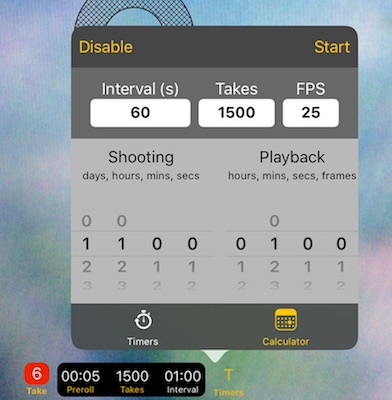
Timelapse was another major branch of the app.
A good timelapse is not only a camera feature; it is a planning problem. You need to decide how long the real event lasts, how often to capture frames, what playback frame rate will be used, and how long the final clip should be.
STARTREC included a timelapse calculator to make those relationships visible before shooting. You could work in either direction:
- enter the interval time, number of takes, and desired FPS;
- or enter the total shooting duration, interval, FPS, and target playback length.
The app would calculate the required recording time, number of frames, and resulting playback duration. This mattered because timelapse errors are expensive: discovering after two hours that you chose the wrong interval is frustrating. The calculator encouraged a more deliberate workflow.
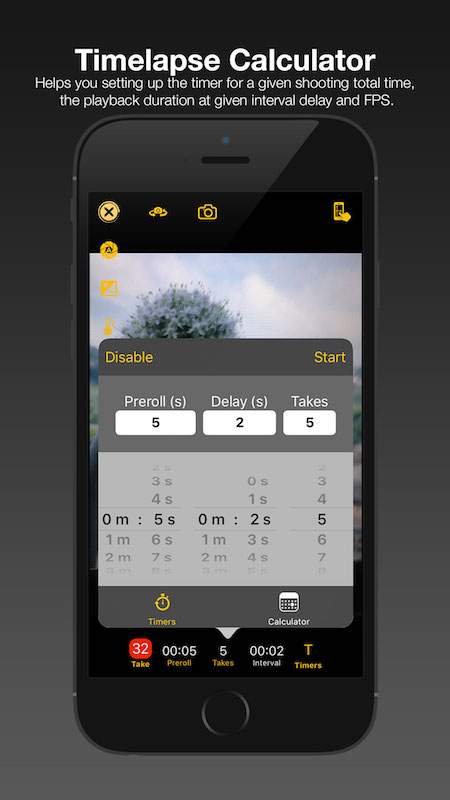
The interface was designed to help answer the practical questions that always appear on location:
- How long should I leave the phone recording?
- How many frames will I get?
- How long will the final clip be?
- Is the battery likely to survive the session?
- Do I need a longer interval or a shorter playback duration?
Timed recordings and session automation
STARTREC used two main timers during automated recording sessions:
- a preroll timer, giving the user time to prepare before capture starts;
- an interval timer, managing the spacing between takes.
For each take, the app could automatically trigger start and stop according to the selected capture mode: photo, video, or audio. This made the phone useful even when mounted on a tripod, placed in an awkward position, or used as an unattended camera.
The timed-recording logic was deliberately generic. Rather than treating timelapse as a separate toy mode, the app considered recording as an event that could be scheduled, repeated, and coordinated. That same design could support a single timelapse camera, an audio-only rehearsal recorder, or a multicam session where each device had its own role.
Manual camera controls and the “Touchy” interface
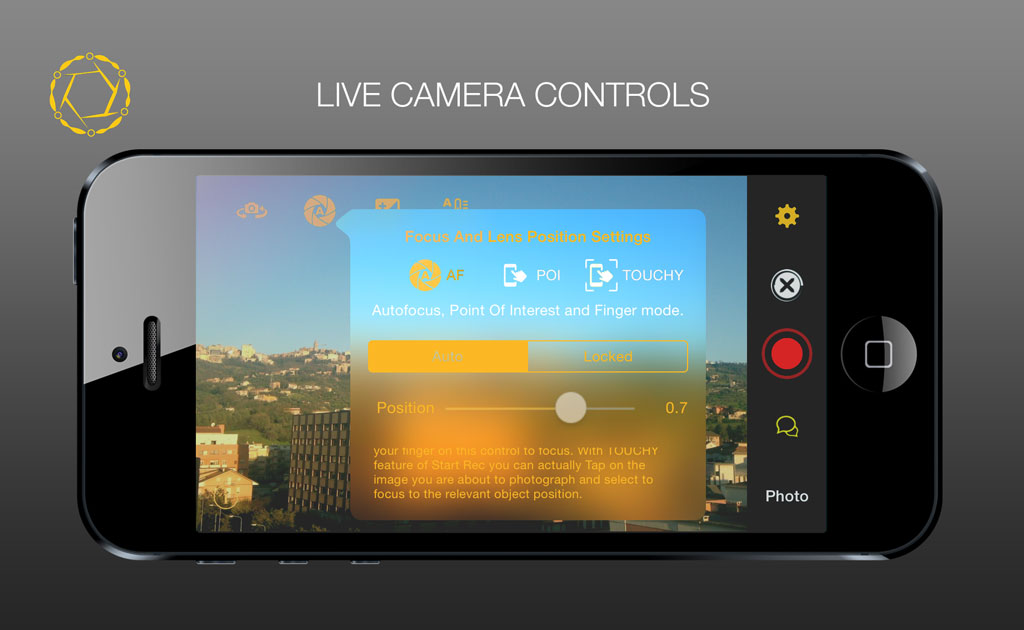
One of the most distinctive STARTREC ideas was the way it handled camera controls.
Instead of hiding advanced controls inside nested panels, the app experimented with dynamic, configurable touch areas on the live preview. I called this approach Touchy mode. The idea was to turn the display itself into a performance surface for camera operation.
By dragging or touching defined regions of the preview, the user could control and lock parameters such as:
- focus;
- exposure;
- white balance;
- camera sensitivity;
- record triggering;
- other capture-related actions depending on the current layout.
The important part was that the touch areas were not meant to be fixed forever. They could be configured according to the shooting situation. A tripod-mounted phone used as a locked-off wide shot does not need the same interface as a handheld phone used for close-up details. A timelapse camera has different priorities again.
This felt especially promising for small crews and solo creators. The mobile device already has a high-quality display, a precise touch surface, motion sensors, microphones, storage, and a camera. STARTREC tried to treat those elements as a single creative control instrument.
Media gallery and GIF generation
The app also included an on-device media gallery and a GIF generator.
This may sound secondary, but it was part of the same philosophy: a recording tool should let you inspect and repurpose material quickly, without waiting for a full desktop workflow.
After a session, you could browse captures directly on the device, review what had been recorded, and create lightweight animated previews. For rehearsals, backstage material, experiments, or social sharing, a quick GIF could communicate an idea faster than exporting and editing a full video.
STARTREC as a small production system
The most interesting part of STARTREC was not any single feature. It was the attempt to combine several layers that are usually separated:
- capture;
- synchronization;
- local networking;
- messaging;
- media exchange;
- planning;
- manual camera operation;
- session roles.
In a conventional workflow, these tasks are split across many tools: a camera app, a chat app, a file-transfer method, a timecode system, a timelapse calculator, and a desktop editor. STARTREC tried to gather the most immediate parts of that workflow into one local mobile environment.
The ambition was not to replace a professional studio. It was to make a rehearsal room, a small stage, a classroom, or an improvised film set behave more like a coordinated production space.
Looking at today’s tools
When I recently saw Apple’s Final Cut ecosystem on iPad evolving around mobile capture, multicam workflows, and camera control, and when I looked at Blackmagic Camera for iOS with its professional camera-style interface, the old STARTREC idea suddenly felt familiar again.
Blackmagic Camera now presents a phone as a serious digital film tool, with quick access to frame rate, shutter angle, white balance, ISO, focus aids, overlays, and media workflows. Apple’s mobile video ecosystem similarly points toward tighter integration between shooting, editing, and device-to-device production workflows.
STARTREC was far rougher, of course. It was an independent experiment, not a polished commercial platform. But the direction was similar: mobile devices as coordinated creative instruments rather than isolated capture gadgets.
That is why I still consider the project worth documenting. Even unfinished projects can contain ideas that later reappear in the mainstream, sometimes in much more refined forms.
Videos
Promo Video
Touch Live Controls
Live Session Footage
🎵 Music by Christian Cellini. Used with permission.
What I would revisit today
If I returned to STARTREC today, I would probably keep the original spirit but modernize the architecture heavily.
The areas I would revisit first are:
- tighter integration with modern AVFoundation APIs;
- better timecode and metadata export;
- support for modern iPhone camera capabilities;
- a cleaner SwiftUI-based control interface;
- local peer discovery and roles with clearer session states;
- optional project export for desktop editing;
- safer file transfer and recovery after interrupted sessions;
- better battery, thermal, and storage monitoring;
- a private beta workflow before any public source-code release.
The core idea still feels alive: a set of nearby phones should be able to become a small synchronized production system in minutes.
All images, promos, graphic design, UI elements are (c) Copyright 2013-2026 Luca Cipressi - milletgrain. All Rights Reserved.