Mobile Apps
A curated archive of iOS and Android apps I developed over the years
Over the years, I developed and published a number of mobile apps, primarily for Apple iOS, with some experiments also reaching Android through Java and Kotlin.
This post collects the apps that still feel worth documenting: not necessarily because they are maintained today, but because each one captured a clear idea. Some were practical utilities, some were playful experiments, and some were small attempts to make a phone behave less like a generic device and more like a personal instrument.
Some of these projects are open source, and I have linked the public repositories where available.
What we now call “apps” began as simple, standalone tools. These are mine: crafted from scratch, designed with care, and sometimes with a bit of eccentric joy.
ANTOINE: that little Prince 🤴

ANTOINE was an experimental text-reader app based on The Little Prince by Antoine de Saint-Exupéry.
The idea was to move beyond the usual “ebook page on a screen” approach and treat reading as an interactive, multilingual, sensor-enhanced experience. Instead of simply scrolling through text, the reader could touch paragraphs, compare translations, change the visual language of each edition, and discover a hidden arcade layer buried inside the illustrations.
The app was built around a simple but delightful question: what if a literary classic could behave like a small interactive object rather than a static digital book?
Features
- Full text of The Little Prince in four languages.
- Interactive language switching directly at paragraph level.
- Tap once to cycle through translations, or toggle between a preferred language pair.
- Independent font-size and color settings for each language.
- Embedded illustrations animated with subtle parallax and gyroscopic motion effects.
- Hidden side-scrolling arcade mini-game based on the same visual world.
- Illustrations transformed into enemies, bonuses, and playful objects.
- Dynamic soundtrack and sound effects reacting to gameplay intensity.
The mini-game was intentionally unexpected. I liked the idea that a quiet reader could suddenly reveal a second personality: part book, part toy, part little audiovisual machine.
🎵 Music composed and performed by Christian Cellini. Used with permission.
CHATEA Messaging App




CHATEA is a native iOS peer-to-peer messaging app for nearby devices, designed around local communication rather than cloud infrastructure.
The app supports real-time conversations with text, audio, photos, and hand-drawn sketches. It was also built with a playful walkie-talkie function: audio messages could behave more like push-to-talk communication than ordinary voice notes.
The name blends “Chat” and “Tea”, with a nod to the Mandarin word 茶 (chá), meaning tea. The icon reflects this reference.
Features
- Real-time text messaging.
- Emoji-friendly chat conversations.
- Photo sharing with previews.
- Hand-drawn sketches created directly on the touch screen.
- Push-to-talk audio messages with walkie-talkie-style playback.
- Local, lightweight conversation flow.
- An intentionally “amnesic” data store: once the app is closed, transcripts are not treated as a permanent archive.
The app belongs to an earlier period of iOS development and is now archived, but it still documents an interesting design direction: nearby mobile devices as a temporary, local social space.
Source code
MYTUNA: Tunings Librarian



MYTUNA is a tuning preset organizer for musicians who work with guitars, basses, violins, and other stringed instruments.
The practical need was obvious: musicians often use many tunings, especially when moving between different instruments, open tunings, extended-range instruments, experimental setups, or studio sessions. Writing those tunings down in notes is possible, but not very satisfying. MYTUNA was meant to be a small personal librarian: structured, visual, and able to play back the tuning for immediate reference.
The original project went online on the App Store in 2017. It was later removed from the store with my other apps, then eventually cleaned up and released as open source.
Features
- Create, save, and label custom tunings.
- Support for instruments with different string counts.
- Audio preview of each tuning.
- Sine-wave reference tones for individual strings.
- Full tuning playback as arpeggios or strummed sequences.
- Optional note recognition.
- CSV export and import, compatible with common spreadsheet tools.
- iCloud support for syncing and backup.
- Native iPhone and iPad interface work.
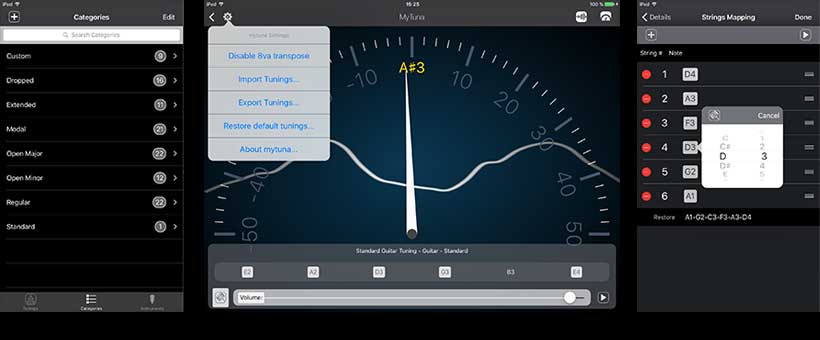
MYTUNA tunings librarian
Technical notes
The app was written as a native iOS project with a mix of Objective-C and Swift, using AudioKit for audio-related functions. A large part of the effort went into the user interface, because a tuning librarian is only useful if the musician can understand and recall presets quickly.
Source code
PIANOTONER / ToneTuna

PIANOTONER, also known as ToneTuna, is a precision tone generator built around a playable piano-style interface.
It began as a piano tuning assistant, which explains the name: a contraction of “piano”, “tone”, and “tuner”. The concept then broadened into a general-purpose tone source for tuning stringed instruments, synthesizers, analog gear, and any musical setup where a clean reference tone is useful.
Rather than offering a generic list of frequencies, the app used a familiar keyboard interface covering the standard piano range. This made it immediate for musicians: choose a note, hear the tone, adjust the reference pitch, and work by ear.
Features
- Interactive piano keyboard interface.
- Accurate sine-wave generation across the 88-key piano range.
- Adjustable A4 reference pitch.
- Useful for piano, synth, stringed-instrument, and analog-equipment tuning.
- Low-latency playback suitable for practical tuning work.
- Native iPhone and iPad support in the iOS version.
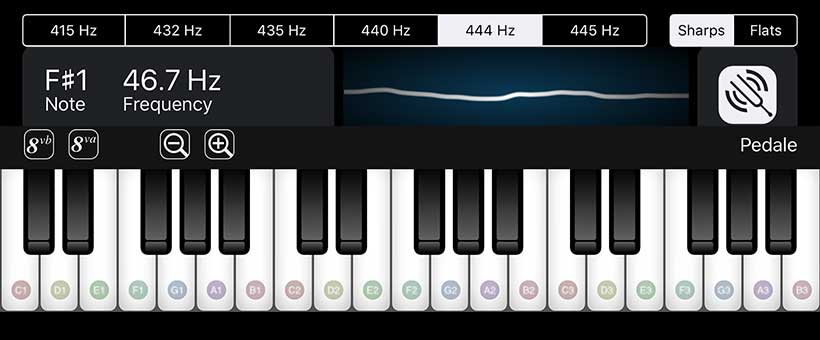
ToneTuna: sine wave piano tone generator
iOS version
The iOS version was written in Swift and Objective-C, using AudioKit 4.4. It supported both iPhone and iPad layouts and required iOS 10 or later. The app was retired from the App Store around 2018 and is now archived.
Android version
The Android version was a smaller native port written in Java and Kotlin. It used the JSyn library for tone generation and preserved the central idea of the original iOS app: a simple, reliable tone generator for musicians.
Source code



SHARI: PDF Reader with WebDAV Server


SHARI is a simple PDF reader with a built-in WebDAV server, created for people who prefer local file management over cloud storage.
The idea was intentionally modest: combine a pleasant PDF reading experience with a direct way to move files on and off the device. Instead of syncing through a cloud service, the app exposes its local document directory over the local network. A laptop or desktop can then upload and download PDFs through a browser, Finder, or any compatible WebDAV client.
This made SHARI useful for older iPads, air-gapped workflows, local archives, teaching material, manuals, music scores, and situations where “just put the file on the device” is still the most practical solution.
Features
- Smooth PDF reading interface.
- Local WebDAV server for uploads and downloads.
- File management over Wi-Fi without cloud storage.
- Simple local-first document workflow.
- Useful for manuals, scores, reference PDFs, and private archives.
Technical notes
SHARI combined two open-source projects: PDF Reader by Julius Oklamcak and GCDWebServer by Pierre-Olivier Latour. The project has not been updated since 2017, so some UIKit deprecations are expected. A modern rewrite would probably use Swift and a newer document architecture.
Source code
Closing thoughts
Looking back at these apps, what connects them is not a single technology stack. Some are music tools, one is a reader, one is a messenger, one is a document utility. What connects them is a preference for small, focused tools that do one unusual thing with care.
They also reflect a period when mobile development still felt unusually open to personal invention. A phone could be a book, a tuner, a walkie-talkie, a local server, a pocket instrument, or a small creative studio.
That was the fun of building them.